


DOOR: Smart Access & Control
4.1395.00 Reviews
App Specs
- Version
- 3.8.7
- Updated On
- License
- Free
- Downloads
- 100,000+
- Developer
- Latch, Inc.
- Categories
- Lifestyle
- Platform
- Android
Screenshots
 Analysis by AppCompare
I judge a door-control app by a practical question: does it fit the way a building already works, or does it add another chore to the day? DOOR: Smart Access & Control is aimed at people who want to manage access and related services from a phone. That can be useful, but its value depends heavily on having a compatible access setup and a real reason to manage it digitally. I would not treat it as a universal replacement for keys or as a security upgrade on its own.
What the free price does—and does not—tell you
DOOR is a free lifestyle app from Latch, Inc., so there is no purchase price to pay simply to download it. That makes trying the app a relatively low-commitment decision. It does not, by itself, mean that every door, lock, building service, or connected feature is free to use; the app’s usefulness depends on the access system and services available to you.
That distinction matters more here than it might with a standalone utility. A free app can still be of little practical value if your building does not use a compatible setup, while a resident or property user who already has access may find the app useful without shopping for a separate product. I’d check whether your property or access provider supports it before making it part of your routine.
Where the value comes from
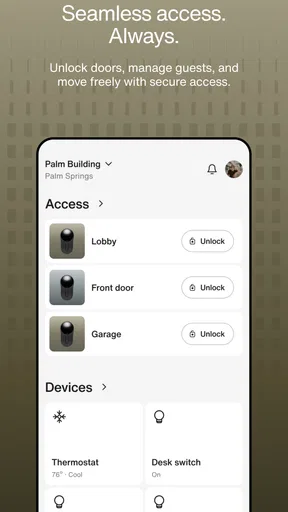
The main appeal is bringing everyday access tasks into one mobile place. Being able to manage entry, keep track of activity, and handle service-related tasks can reduce the small bits of coordination that otherwise happen through separate tools or messages. The biggest gain is convenience, not a promise that a phone app alone makes a home safer.
In the wider lifestyle-app category, many alternatives focus on one narrow job: a lock’s own companion app may handle entry, while a building portal may cover resident requests or bookings. DOOR’s broad pitch is more appealing when those needs overlap. If you only need to operate one lock and its maker already provides a straightforward app, switching may add little. If access and building services are both part of your regular routine, a single place to start can be more worthwhile.
Trade-offs before you rely on it
A phone is not a dependable substitute for every backup plan. Batteries run down, devices can be misplaced, and connectivity can be unreliable, so I would keep whatever physical or building-approved alternative is available and learn how entry works if the app is not reachable. That is especially important before relying on digital access for a guest, a delivery, or a time-sensitive appointment.
There is also a setup dependency: the app only helps with doors and services that are actually supported in your situation. Before changing habits, I’d confirm which doors it can control, whether the people who need access can use it, and what to do if a phone is replaced. Those checks are more useful than assuming that a feature shown in an app will be available at every property.
Worth Reading Before You Choose

EA SPORTS FC Mobile 26 Is a Bigger Football Game, but It Takes Time

Flipboard Shows What News Apps Must Do Beyond the Feed

Switching to Android Auto Means Rethinking Your Driving Routine

Google Calendar Makes a Crowded Week Easier to Manage

Ludo King Makes the Most of the Minutes Between Plans

Baby Panda World Brings Quick Play to Modern Phones, but Its Game Library Feels Busy
The current release is version 3.7.5 and the minimum operating-system requirement is 8.0. That gives prospective users a quick compatibility check, but a supported operating system does not guarantee that a particular lock or property setup will work. The app is rated for Everyone; that describes its age classification, not the level of security a specific door provides.
Who is likely to get the most from it?
I’d consider DOOR if I lived or worked somewhere that already uses its access system and I regularly needed to coordinate entry or use related services. It is also a sensible option to investigate if household members or visitors need a clearer access routine than passing around one physical key. The best fit is someone whose building has already made the relevant functions available.
I’d skip it, or at least avoid depending on it, if I had no compatible door or service to manage, preferred a simple physical key, or wanted an app to work with any smart lock regardless of brand or building. People who rarely manage guest access may not gain enough convenience to justify learning another interface. In that case, the existing lock’s own controls or a basic building contact may be the simpler choice.
A realistic day with mobile access
Picture coming home with bags while a family member arrives separately. If your property supports the app and their access is arranged, mobile control could make that handoff less awkward than coordinating a key. For a scheduled visitor, I would sort out access in advance rather than waiting until they are standing outside, and I would keep a backup plan in case either person’s phone or connection fails.
That same habit helps with service visits: confirm the relevant access arrangement and timing first, then use the app only for what the property has enabled. A digital control is most useful when it reduces coordination without making the entry plan depend on a last-minute tap. The app can support a routine, but it cannot decide who should be allowed in or replace clear communication.
Getting Started with DOOR: Smart Access & Control
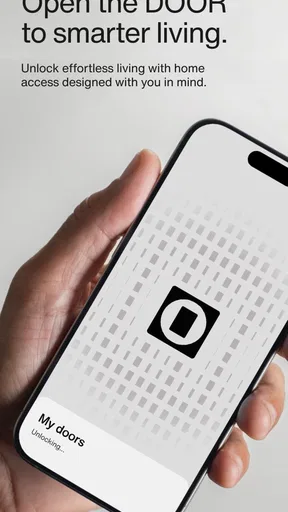
First things first, downloading and setting up DOOR: Smart Access & Control is a breeze. Available on both Android and iOS, the app installs quickly and walks you through the setup process with a friendly tutorial. It's like they're holding your hand, but not in a creepy way. The interface is sleek, intuitive, and super user-friendly.
Once you're in, you can connect your smart locks with just a few taps. The app supports a wide range of devices, which is a big plus if you’ve got a mix-and-match smart home setup. No more worrying about compatibility issues.
Features That Stand Out
Let’s dive into what makes this app a must-have. First off, the remote access feature. It's like magic! Imagine being able to lock or unlock your door from anywhere. Maybe you're at work and a friend is dropping by to pick something up. You can let them in without leaving your desk. Convenience level: Expert.
Real-time alerts are another game changer. Get notifications whenever someone accesses your door. It's like having a bouncer at your house, but way more polite. You can even create unique access codes for different users, so you always know who’s coming and going.
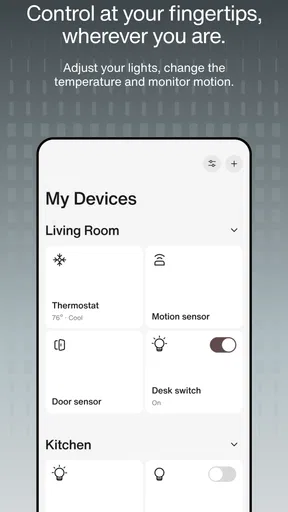
And for those of us who are a bit more tech-savvy, there are advanced settings to explore. You can integrate the app with other smart home devices, creating a seamless ecosystem that works together to keep your home secure.
The Day-to-Day Experience
So, how does DOOR: Smart Access & Control hold up in daily life? Pretty darn well, I’d say. The app is reliable, with minimal glitches, and the updates are regular enough to keep things running smoothly without being annoying.
One of my favorite features is the activity log. It gives you a detailed history of all access events, so you can keep track of everything. It’s peace of mind in app form. Plus, it’s perfect for those "Did I lock the door?" moments. Just check the log!
And a little bonus for the environmentally conscious: the app helps you monitor your energy usage by optimizing the smart lock's battery life. It’s a small touch, but it shows there's some thoughtful design behind this app.
Using access tools thoughtfully
Unique codes and access histories can be convenient, but they work best when treated as part of a routine rather than as a substitute for judgement. I would give each person only the access they need, review arrangements when a visitor’s role changes, and avoid sharing credentials casually in a group chat. If the app lets you distinguish users, that distinction is more useful when the names and permissions remain current.
For households, it helps to agree on one simple rule: who is responsible for arranging access, and what everyone should do if the app is unavailable. That prevents a common source of friction—one person assuming another has handled a visitor. I’d also make sure anyone expected to use mobile entry is comfortable with the setup before an urgent moment, rather than trying to teach it at the door.
When comparing this approach with a conventional key, the trade-off is clear. A key is familiar and does not depend on a phone, while app-based access can make remote coordination and individual arrangements easier. Neither option is automatically safer in every circumstance. The right choice depends on the building’s hardware, how access is managed, and whether the people using the door can follow the same backup plan.
The same caution applies to connected-home integrations. They may be appealing if you already manage several devices together, but adding more links can make troubleshooting less straightforward. I would begin with the core door workflow, learn what happens when it succeeds and when it fails, and only then explore extra connections. A simpler setup that everyone understands can be more valuable than a complicated one that no one remembers how to use.
Questions I would settle before making it routine
Can I use it at my address? That is the first question I would ask the building manager or access provider, because the app’s general purpose does not guarantee that a specific door is enrolled. I would also ask which people can be invited, how their access is set up, and whom to contact if the door does not respond. Getting those answers first avoids discovering a limitation while a guest is waiting.
What if I change phones or lose mine? I would find out how account recovery and access restoration work before relying on mobile entry, and keep the approved fallback available. What about visitors who do not use the app? I would confirm the property’s permitted guest procedure rather than assume a temporary code or remote unlock is available in every case. These practical details determine whether digital access is genuinely convenient for a household.
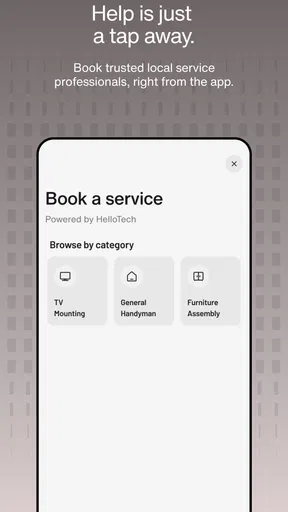
Does the app replace a building’s normal communication channel? I would not assume so. Booking services and managing a door are different tasks, and a resident may still need to follow property procedures or contact staff for issues outside the app’s controls. Treating DOOR as a useful access interface, rather than the authority on every building matter, keeps expectations realistic.
Final Thoughts
In short, DOOR: Smart Access & Control is a fantastic addition to any smart home. It’s all about making life more convenient, and it does just that. While no app is perfect, the minor hiccups here and there are easily overshadowed by the overall functionality and ease of use.
If you're looking for a way to streamline your home security and make your life a bit easier, this app might just be the key (pun intended). Give it a try and see how it fits into your routine. You might just find it’s exactly what you’ve been looking for.
Ready to upgrade your home security game? You can download the app from the app store and start enjoying the benefits today!
My verdict is to try it when the relevant access setup is already available, not to adopt it on the assumption that it will work with any lock or property. It is free to download, has a 3.7 average from around 1.7 thousand ratings, and has been installed over 50 thousand times; that gives a little context about its audience, but it is not a guarantee of fit or reliability at your address. The app has received 264 reviews, and its release date is July 1, 2024.
For me, the best reason to choose it is the possibility of handling access and service tasks through one app when those functions are already part of daily life. The strongest reason to pass is a mismatch between the app and the actual building, or a preference for a simpler key-and-lock routine. Check compatibility, learn the fallback procedure, and then decide whether the convenience is worth making it part of your day.
Pros
- User-friendly interface for easy navigation.
- Seamless integration with smart home devices.
- Customizable access levels for security.
- Reliable performance with minimal downtime.
- Real-time notifications for added security.
Cons
- Limited compatibility with older devices.
- Subscription required for premium features.
- Occasional connectivity issues reported.
- Setup can be complex for some users.
- Limited customer support on weekends.
FAQs for DOOR: Smart Access & Control
What is DOOR: Smart Access & Control, and how does it work?
DOOR: Smart Access & Control is an app designed to enhance security and convenience by allowing users to manage entry points remotely. It works by connecting to compatible smart locks and access systems, enabling you to lock or unlock doors, monitor entry logs, and manage access permissions from your smartphone.
Is DOOR: Smart Access & Control compatible with all smart locks?
While DOOR is compatible with a wide range of smart locks, it’s essential to check the app’s official compatibility list to ensure your specific device works seamlessly. The app typically supports popular brands, but it’s always a good idea to verify compatibility before purchasing a new lock.
How secure is DOOR: Smart Access & Control in protecting my home?
DOOR: Smart Access & Control employs advanced encryption protocols to ensure your data and access are secure. The app continuously updates its security measures to protect against potential threats. It’s also recommended to enable two-factor authentication for an added layer of security.
Can multiple users access DOOR: Smart Access & Control on the same account?
Yes, DOOR allows multiple users to access the same account, making it ideal for families or shared living spaces. You can set individual permissions to control who can access specific doors or areas, ensuring everyone has the appropriate level of access without compromising security.
Does DOOR: Smart Access & Control require a subscription or additional fees?
DOOR offers a basic version for free, with premium features available via a subscription model. The premium version may include advanced analytics, enhanced security options, and priority customer support. It’s advisable to review the subscription terms to understand what features are included and decide if they meet your needs.


